
 January 2, 2026
 11 min read
Managing a business often feels like drowning in a sea of paperwork. One of the most critical yet labor-intensive tasks in any procurement department is handling the influx of purchase orders. Manual data entry is not only slow—it is expensive. When employees type in numbers by hand, human error is inevitable, leading to duplicate payments, incorrect shipments, and strained vendor relationships.
To solve these common office headaches, smart business owners are turning to Purchase Order OCR (Optical Character Recognition) technology. By choosing to automate order entry, firms can transform hours of manual labor into just a few seconds of digital processing. In this guide, we explore how AI-powered PO processing is redefining modern accounting and procurement.
1. The Core Technology: How AI-Powered OCR Works
Simple text reading is no longer sufficient for the complex layouts of modern business documents. Today’s Purchase Order OCR systems utilize Intelligent Document Processing (IDP) to “understand” the data they read. Unlike basic scanners, this AI-driven tool recognizes the difference between a billing address and a shipping address based on its location and context.
Using machine learning, the software can extract PO data with near-perfect accuracy, regardless of the vendor’s layout. It identifies the PO number, date, vendor contact info, and even complex line items like product names, quantities, and unit prices. This smart logic ensures that your accounting system is fueled by high-quality data from the moment a document is scanned.
2. The Step-by-Step Automated PO Workflow
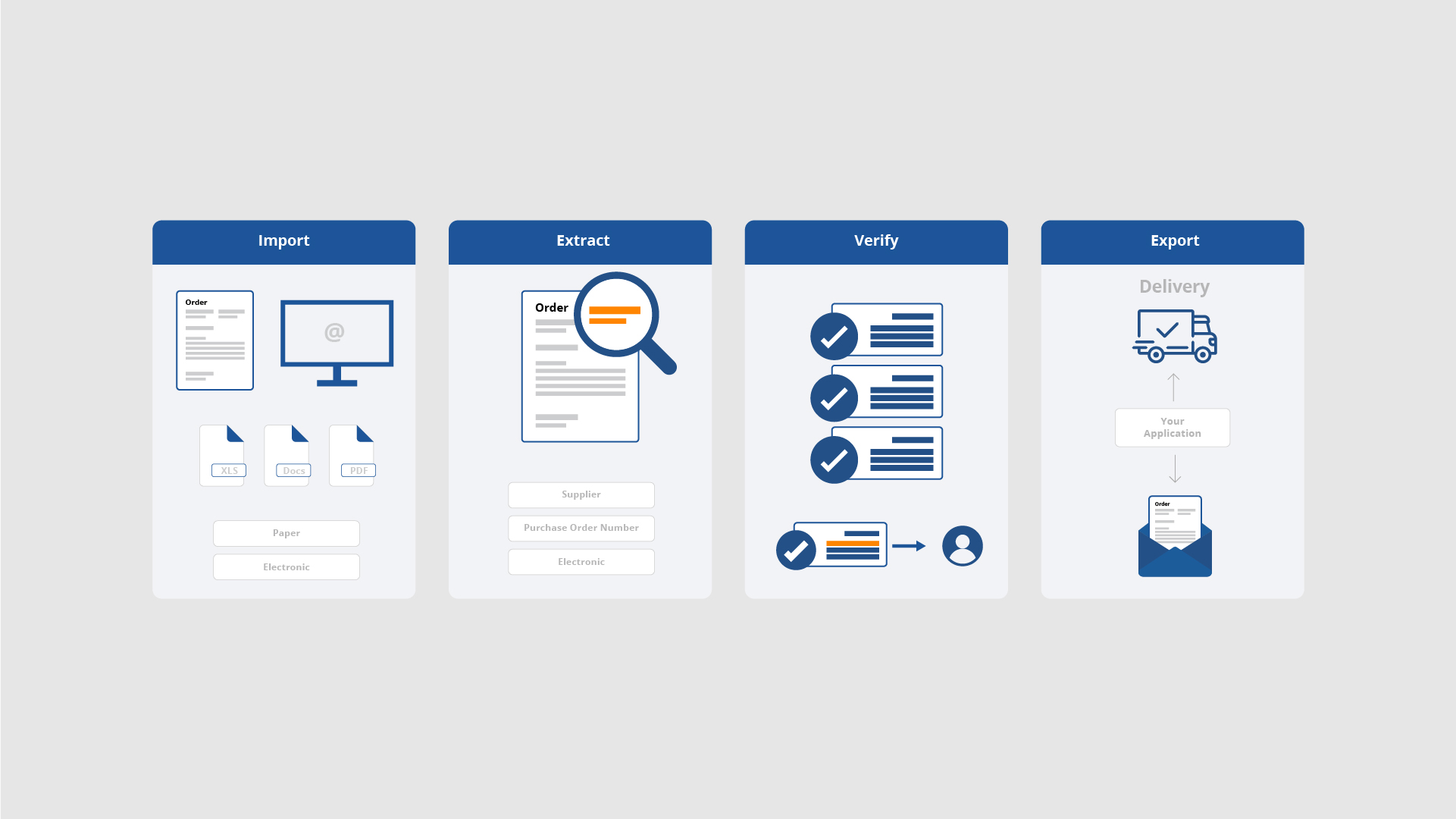
Transforming your procurement cycle from paper-heavy to digital-first follows a seamless, four-step process:
-
Ingestion: Import orders via email, cloud storage (like Google Drive), or physical scanners.
-
Extraction: The Purchase Order OCR engine reads the document in seconds, identifying all critical financial fields.
-
Three-Way Matching: The system automatically compares the PO against your invoices and delivery notes to ensure you only pay for what you actually received.
-
Integration: Once validated, the system can convert purchase order to Excel for reporting or sync the data directly into your ERP like SAP or Oracle.
This workflow takes the pain out of PO processing, allowing your staff to spend more time on high-value tasks instead of staring at tiny numbers on a screen.
3. Strategic Benefits of PO Automation
Implementing Purchase Order OCR provides tangible advantages that go beyond simple time savings:
-
Financial Accuracy: Eliminate “fat-finger” errors where a single misplaced zero can cost your company thousands.
-
Faster Procure-to-Pay Cycles: When you automate order entry, you speed up the entire payment process, which often allows you to negotiate early-payment discounts with suppliers.
-
Real-Time Cash Flow Visibility: By choosing to extract PO data digitally, you gain instant insights into how much money is committed for the coming months, helping you make smarter budgeting decisions.
-
Scalability: Process 1,000 orders as easily as 10. As your business grows, your PO processing costs stay low and predictable.
4. Integrating with Popular Accounting Systems
A professional Purchase Order OCR tool shouldn’t exist in a vacuum. It must connect with the software your team already uses. Whether you are a small business using QuickBooks and Xero or a large enterprise relying on Microsoft Dynamics, the ability to convert purchase order to Excel or CSV is vital for data portability.
Modern APIs and webhooks allow for a “frictionless” connection. This means your data flows from the scan directly into your ledger, reducing the need for manual copy-pasting and further minimizing the risk of data transfer errors.
5. Overcoming Challenges and Security Best Practices
While the benefits are clear, security is paramount. Since purchase orders contain sensitive financial details, you must choose a tool that follows strict SOC2 or GDPR standards.
Furthermore, even with advanced AI, we recommend a “human-in-the-loop” approach. A quick human review of the extracted data ensures 100% accuracy before the information is pushed to your main accounting books. This combination of human wisdom and Purchase Order OCR speed is the ultimate recipe for a perfect audit trail.
Conclusion: The Future of Frictionless Accounting
The era of manual data entry is fading. In a world where speed and accuracy define success, Purchase Order OCR is the bridge that connects your physical documents to your digital future. By choosing to automate order entry and extract PO data with AI, you are building a more profitable, organized, and stress-free business.
Don’t let your accounting department get left behind in the old world of slow paperwork. Audit your current PO processing speeds today and see how much more efficient your company can become with the right digital tools.
Why pdftoexcelconverter.ai is The Right Solution For You?
At pdftoexcelconverter.ai, we specialize in making procurement simple. Our state-of-the-art Purchase Order OCR technology is the fastest and most accurate solution for businesses looking to automate order entry.
We help you extract PO data from any vendor layout with a single click and make it incredibly simple to convert purchase order to Excel for your monthly reports. Our system is built for security, scalability, and seamless integration with your favorite accounting tools. Trust pdftoexcelconverter.ai to turn your messy paperwork into high-speed digital intelligence.


